Place Order/Upgrade Dialog
| Step 1 | New license: Select the customer: Customer View Functions. Upgrade license: Select the existing license: License View Functions. |
||||
|---|---|---|---|---|---|
| Step 2 | Select category: 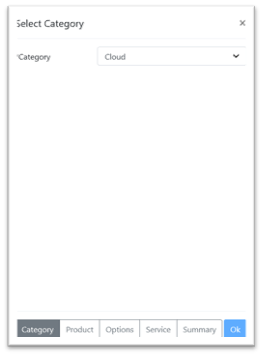 - CLD-EX: The Rotronic exclusive cloud. Please contact Rotronic AG for pricing. - WEB: The on-premis solution. - Cloud: The SaaS solution. |
||||
| Step 3a | Select the product Cloud: 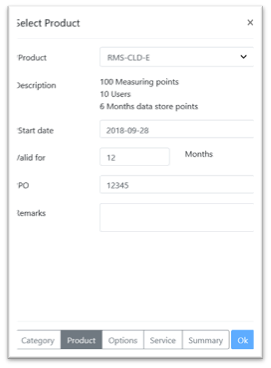 Select a Base Product: - Product: A product for the selected category can be selected. - Description: Included options for the selected product are displayed. - Start date: Date as of when the license starts. - Valid for: License period. - PO: Internal PO to Rotronic, the invoice will state this PO. - Remarks: used for any notes or messages. Fields marked with an * are mandatory Cloud licenses are active immediately start date relates to billing start. You may use a future start date to include setup time. For example: - Order date = 15/JAN/2021 - Start date = 01/FEB/2021 |
||||
| Step 3b | Select the product Web: 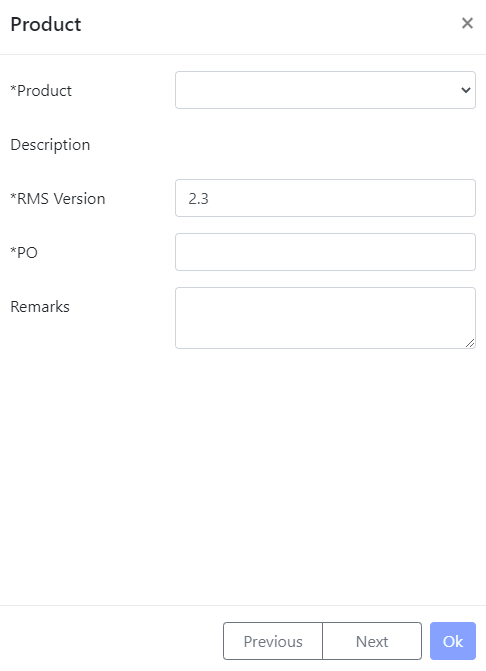 Select a Base Product: - Product: A product for the selected category can be selected. - Description: Included options for the selected product are displayed. - RMS Version: Version of the software that is compatible with the license (Please state only the major and minor version numbers: x.x). - PO: Internal PO to Rotronic, the invoice will state this PO. - Remarks: used for any notes or messages. Fields marked with an * are mandatory |
||||
| Step 4 | Select the options: 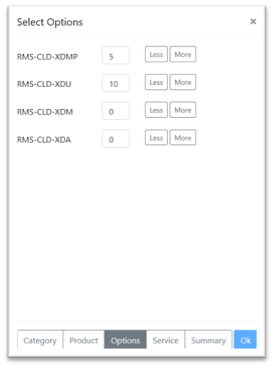 All options for the selected category are displayed. For existing licenses previous upgrades will be included. Options WEB: - RMS-WEB-EXP: Enable the export of data in chronological order. Required when exporting data to OSISoft PI. - RMS-WEB-DEL: Enables deletion of older data that is being placed into a data historian. WARNING data will be deleted from the SQL database if this option is selected!!! - RMS-WEB-MAP: Access to the mapping function (additional price). - RMS-WEB-XDA-20: Access to the telephone/SMS notification function, including 20 notifications (additional price). - RMS-WEB-XDA-100: Access to the telephone/SMS notification function, including 100 notifications (additional price). - RMS-WEB-XDA-T: Access to the telephone/SMS notification function (additional price). - RMS-WEB-XDM: Defines how many months data is stored for (maximum 120 months). Required in combination with the RMS-WEB-DEL. - RMS-WEB-XDMP: Additional measuring points (additional price). - RMS-WEB-XDU: Additional users (additional price). Options CLD: - RMS-CLD-XDA-20: Access to the telephone/SMS notification function, including 20 notifications (additional price). - RMS-CLD-XDA-100: Access to the telephone/SMS notification function, including 100 notifications (additional price). - RMS-CLD-XDA-T: Access to the telephone/SMS notification function (additional price). - RMS-CLD-XDM: Defines how much memory is required (in years). - RMS-CLD-XDMP: Additional measuring points (additional price). - RMS-CLD-XDU: Additional users (additional price). \ |
Additional Notes to RMS WEB/CLD XMA-*: Options are NOT stackable The Number in * refers to the included notification per Month. Additional Invoices are charged if exceeded. Additional Units may vary. \ |
\ | --- \ | Updated 29.04.2024 |
| Additional Notes to RMS WEB/CLD XMA-*: Options are NOT stackable The Number in * refers to the included notification per Month. Additional Invoices are charged if exceeded. Additional Units may vary. |
|||||
| Step 5 | Complete the SLA/SaaS contract: 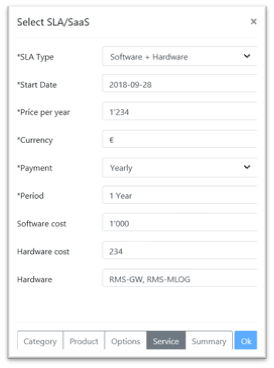 All details here will be added to the SLA/SaaS contract: - SLA/SaaS type: A SLA/SaaS type for the selected category can be selected. - Start Date: Enter the date where the SLA/SaaS contact starts. If placing an order during the month, Rotronic will automatically start the SLA/SaaS on the first day of the next month. - Price per year: End user price for the SLA/SaaS. - Currency: Currency. - Payment: Yearly or monthly payment option. - Period: simply add 0, this field is not required. - Software cost: Cost for software (optional). - Hardware cost: Cost for hardware (optional). - Hardware: List of hardware used (optional). Fields marked with an * are mandatory if the SLA/SaaS Type is not "None" You may use a future start date based on estimated project delivery date: - Order date = 15/JAN/2021 - SLA Start date = 01/FEB/2021 |
||||
| Step 6 | Summary: 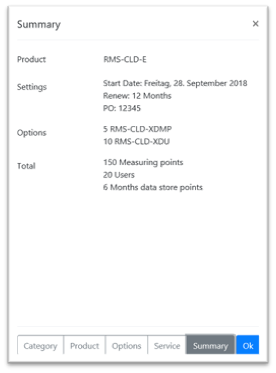 |