Device
The RMS-CONFIG device menu contains the possibility to add a device:
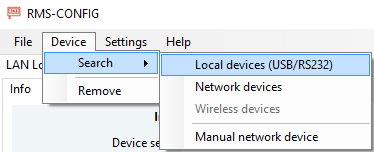
| "Search" > "Local devices" (USB/RS232) | Searches all local RS232 and USB (FTDI) ports. (E.g. connect a HCD probe to the PC with AC3001 cable). |
|---|---|
| "Search" > "Network devices" | Search all devices within the sub-network. |
| "Search" > "Wireless devices" | Pair wireless devices (only with RMS-DONGLE-868/915). |
| "Search" > "Manual network devices" | Instead of searching, users give IP address of the device directly. |
| "Remove" | Remove device from the device list. |
Once a device has been added, the Device Settings can be reviewed/changed.