Integration in the RMS System
The RMS-8ADC-L-R-A can be integrated in the RMS system through the RMS-Converter, which shall be integrated to the RMS system beforehand. More information can be found in the RMS-Converter manual.
Integration in following steps as example
| Step 1 | In "RMS SW", "Tools" > "Setup" > "Devices", select the RMS-converter and click "Add/Search" 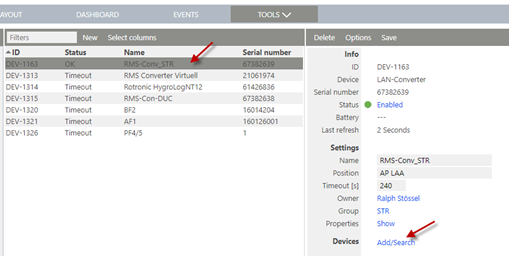 |
|---|---|
| Step 2 | Select the device type "RMS-8ADC-L-R-A" and enter the IP address. Then click "Search Device". 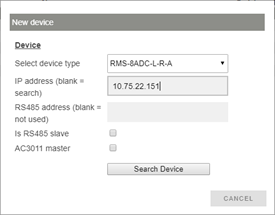 |
| Step 3 | The following window will appear, where some configurations will be possible. Keep interval to 60 s. Example below: We choose Probe 2 and the analog input indicates differential pressure. 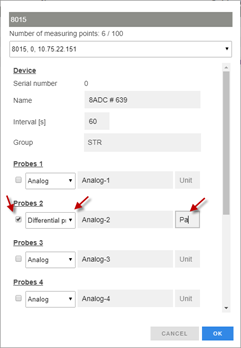 Press "OK" to continue. |
| Step 4 | The following dialogue box will pop up. Press "OK" to continue:  Device will now appear on the RMS device list. 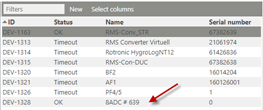 |
| Step 5 | To define scaling of the analog inputs, click on "Properties: show" on the right hand side. 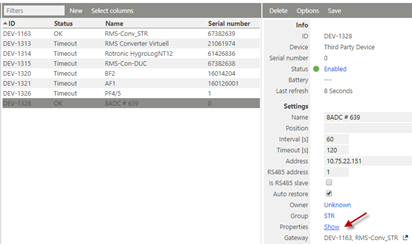 In this case, 4 mA to 20 mA corresponds -50 to 50 Pa. 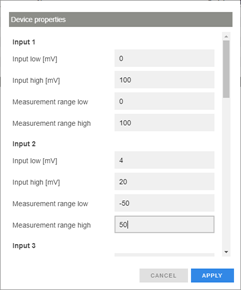 NOTE: The unit mentioned for input low and input high is currently mV. This should actually be mA. This will be fixed in the next version. |
| Step 6 | The RMS-8ADC-L-R-A is now integrated in the RMS: 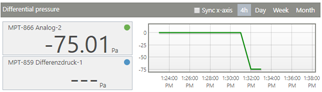 |