Configuration with RMS-CONFIG
If you do not want to connect the device to the Rotronic Cloud, the server must be configured in the device.
| Step 1 | Connect the device to the local network as described in "Housing Installation". Start the RMS-Configuration software. |
|---|---|
| Step 2 | Search for the device under "Device" > "Search" > "Network Device". The software finds all RMS devices in the local network. |
| Step 3 | Enter the host (server address) and the URL of the software services under "Settings". |
| Step 4 | Finish configuration with "Write". 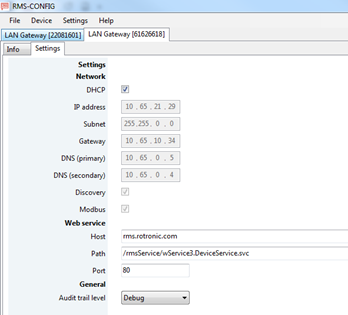 |
Once they have been configured with the correct server address, the devices can then be integrated into the server software. Details are described in the E-SM-RMS-WEB.