Display Overview
The display of the WiFi Data Logger provides essential real-time information, ensuring easy monitoring and quick access to key parameters. Designed for user-friendly operation, it offers a range of functions to display measurement values, status indicators, and device settings.
This section provides a detailed overview of the available display functions, explaining their purpose and how to navigate through them efficiently. The image below represents all possible symbol that may appear on the screen. Each of these symbol is explained individually in the tables below, providing a detailed overview of their purpose and functionality. Understanding these features will help you make the most of the device, ensuring optimal performance and accurate data interpretation.
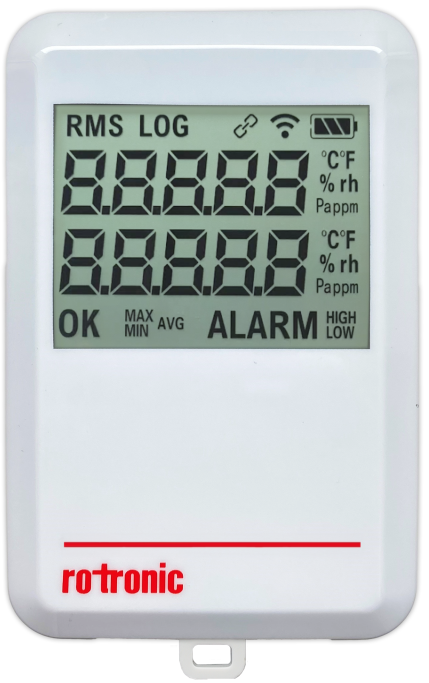
| RMS | Logger is currently connected to RMS and write protected for RMS-App. |
|---|---|
| LOG | Logger is currently logging. |
| Chain Logo | Logger is currently being connected to the RMS software. |
| **Wireless Logo ** | WiFi connectivity strength. |
| Battery Logo | 3 segment for battery level. |
| 8-Segment | Refers to the display sections used to represent numerical values and status indicators. Each segment can display different types of information, including: - Numbers for values - E for errors - H for high alarm - L for low alarm |
| Parameter | Refers to the display sections used to represent the units of the measured values - °C/°F: Temperature unit - %rH: Relative humidity - Pa: Differential pressure - ppm or %: CO2 |
| OK | There is currently no alarm. |
| MIN/MAX/AVG | The maximum, minimum and average value (currently not used). |
| ALARM | An alarm is active. |
| Warning | - H for high warning - L for low warning In case of warning, the ALARM symbol is not used. |
| High/Low | High alarm or low alarm is active |
| -E1- | Error message: Modbus sensor unconnected |
| ** -E2-** | Error message: Modbus probe error |
| -E3- | Error message: NTC resistance to low or short circuit between the sensor connections |
| -E5- | Error message: NTC error |
| --.-- | NTC resistance too high, sensor unconnected |
| ---- | Probe connected but value still not available. |
Updated: 16.04.2026