Actions
All actions are shown that are visible to the current user on the basis of the group allocation. Unused actions (no alarm limit allocated) are shown with a block dot.
The following functions are available for creating and editing actions:
| Filter | Filter the list of actions on the basis of the entry |
|---|---|
| New | Add new action |
| Delete | Delete action |
| Save | Save changes |
Every action has the following properties:
| ID | Unique ID number (ACT-xxxx) |
|---|---|
| Name | Freely selectable name |
| Applicable in | Group in which the action can be applied |
| Used by | Alarm limits that use this action |
| Send email | |
| Recipient | One or more users who are to receive the email 1 2 |
| Webcam system | Link under which the current picture of the camera can be called up. For example: http://www2.rotronic.ch/webcam/cam1/current.jpg |
| Converter | If the Webcam is not directly accessible (local network protected by a firewall), the camera must be integrated via an RMS-converter. |
| Webcam URL | URL of the webcam |
| User name | User name |
| Password | Password |
| Chart | Adds the chart of the measuring point as an attachment |
| Time span chart | Number of hours shown in the chart3 |
| Repeat | Repeats the email in the specified interval (up to 10 times). Repeat sending of the email can be ended if the alarm ends or is acknowledged. |
| Switch relay | |
| Relays | Selection of one or more relays |
| Reset | Condition for resetting of the relay 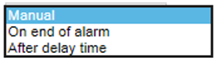 |
| Reset after | The relay is reset automatically at the end of this time |
| Send data via TCP | |
| IP address | Recipient address |
| Data on "On" | String that is to be sent when the alarm occurs |
| Data on "Off" | String that is to be sent when the alarm ends |
1 The user must have the right to receive notifications.
2 Not applicable for alarm scripts.
3 Not applicable for alarm scripts.