Anonymous Authentication issue
Description of the problem:
There is an Anonymous Authentication issue/ server error in wService application
The database was installed on one computer and the RMS software was to be installed on a second server. Installation was complete and license key was registered prior to installing the RMS server on the application server (second server).
After installation and running the connection tests, the following error occurred:
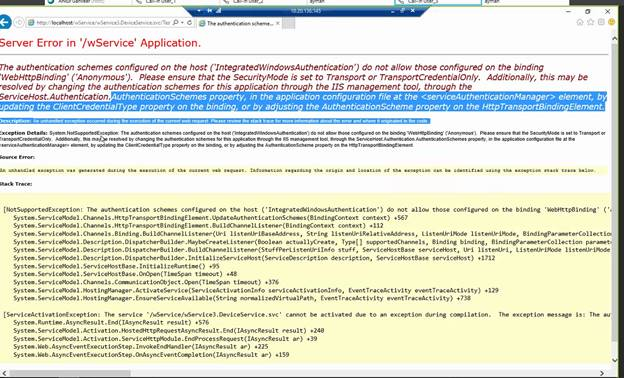
Issue is that the “Anonymous Authentication” was disabled with the web sites in IIS.
Solution:
| Step 1 | Within "IIS Manager", go to "Default Web Site properties". Right click on the "Authentication" icon under IIS > "Open Feature" > Enable “Anonymous Authentication” (which will read as "Disabled")*. * 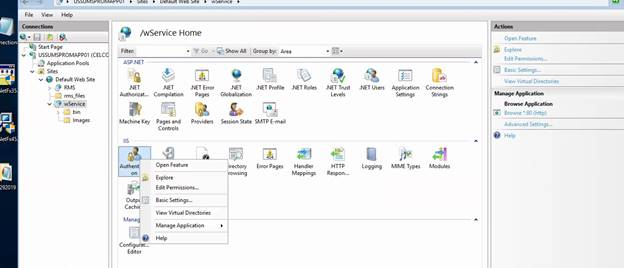 |
|---|---|
| Step 2 | Within "IIS Manager", go to "w/Service". Right click on the "Authentication" icon under IIS > "Open Feature" > Enable “Anonymous Authentication” (which will read as "Disabled")*. * 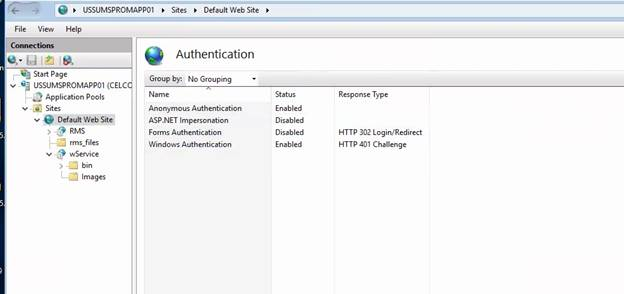 |
| Step 3 | Restart Default Web Site and test connection strings again. |