Device Audit Trail and Status Log
Audittrail and Statuslog
These two features are meant for a deeper analysis of the device. In case of problems or unusual behaviour, it is possible to get further information with these functions.
Audit trail:
The audit trail of the device is like the audit trail of the RMS software. It contains all relevant events that may occur on the device.
Content of an audit trail entry:
| Entry | Description |
|---|---|
| Time stamp | Time of the event |
| Alarm level | Level of the event: - Error - Warning - Information |
| Event type | Type of the event |
| Data | Further information or data to the event |
Status log:
The status log saves the current status of the device with every interval.
Content of a log entry:
| Entry | Description |
|---|---|
| Time stamp | Device time at the interval |
| Command | Command received from the RMS software |
| Status | Measurement status - 0 = No error - 1 = Error ADC1 - 2 = Error ADC2 - 3 = Error on ADC1 and ADC2 |
| Sync | Difference to the system time in milliseconds |
| Ping | Round-trip delay in milliseconds |
Audittrail and Statuslog download:
| Step 1 | Log in to the RMS software > "Tools" > "Setup" > "Device" and select the RMS-ADC-L-R. |
|---|---|
| Step 2 | Select "Options" and click on "Download Audittrail or Download Status Log". 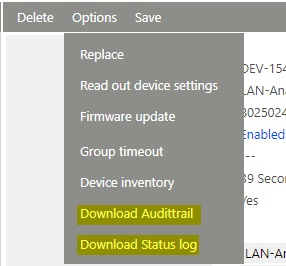 |
| Step 3 | The download is finished when you get one or two csv. files on the bottom part (Depends on the browser)  |
| Step 4 | Send this two files to Rotronic ([email protected]) to troubleshoot the issue. |