Configure your LAN Device
Under Tools > Setup > Devices, select a LAN device, on the right side of the screen the following can be configured:
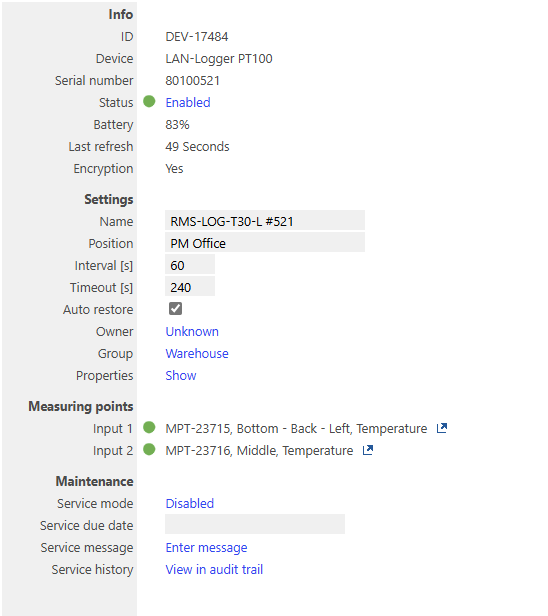
Info:
- ID: Unique device ID, automatically given when the device is added.
- Device: Device family, automatically given when the device is added.
- Serial number: Device serial number, automatically taken from the device.
- Status: the status can be set to enabled and disabled. In order to change the device in RMS-CONFIG, web browser or to add it to another RMS system, it is necessary to disable the device. Click to change the setting.
- Battery: Device battery level, automatically taken from the device.
- Last refresh: Last time that the device communicated to RMS.
- Encryption: Confirms that the LAN communication is encrypted.
| Important: Should a device be disabled, all open reminders, warnings, alarms and errors will be closed and data not yet downloaded from the device will no longer be available! |
|---|
Settings:
- Name: User defined device name.
- Position: User defined device physical position.
- Interval [s]: User defined device log interval.
- Timeout [s]: User defined device time out. When no communication happens within the defined time, then a timeout error is created. The recommendation is to setup the timeout at 4 x the interval.
- Auto restore: After a timeout, should the logged data automatically be downloaded to RMS.
- Owner: User defined device owner. Click to define/change the owner.
- Group: User defined group where the device is located. Click to change the group.
- Properties: Device properties, automatically collected from the device. Click to show the properties.
Measuring points:
- Input 1: Device measuring point 1.
- Input x: Device measuring point x.
Maintenance:
- Service mode: The service mode can be enabled and disabled. The service mode is then visible within the audit trail.
- Service due date: The service due date can be configured and a reminder on the due date will occur.
-
Service message: A service message can be entered and will be logged in the audit trail:
-
Services history: A link to the events tab with a filter on the event "Device Maintenance" and the target (DEV-XXX). View in the audit trail directly filtered for the device and service actions.
Updated: 19.03.2025