Email Report Settings
With email report settings, the user defines the interval, measuring points and receiver for the email report. There is no group structure for the email report settings. All defined email report settings are visible for the whole company. With "Test" button, the email report will be immediately generated and sent.
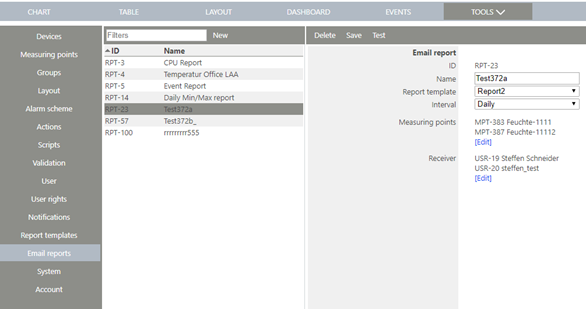
Figure 1: Overview of the email report settings
| ID | Unique ID for the Report |
|---|---|
| Name | Report Name |
| Report template | Template for the data content. Templates are defined in "Report Templates" |
| Interval | How often will the emails be sent: - Daily (Everyday 00:00) - Weekly (Every Monday 00:00) - Monthly (Every 1. of the month 00:00) |
| Measuring points | List of the measuring points for the report (only for measurement data report) |
| Receiver | Receivers of the email report |