Group Settings
Groups can be created, deleted, changed or sorted under "Tools" > "Setup" > "Groups".
Create & Edit Groups
Create the group structure you want in the menu "Tools" > "Setup" > "Groups".
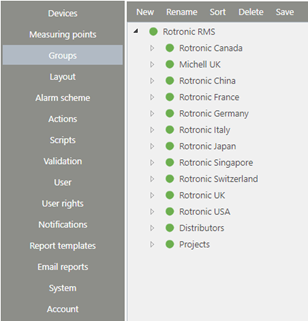
Figure 1: Group structure in RMS
The following functions are available for editing the group structure:
| New | Create new group or subgroup. The new group can be placed in the tree by drag & drop. |
|---|---|
| Rename | Rename selected group |
| Sort | Sort group structure alphabetically (A to Z) |
| Delete | Delete selected group |
| Save | Save current group structure |