Alarm Symbols
All views show alarm and information symbols with the following meanings:
 |
Message | Audit trail information1 |
|---|---|---|
 |
Reminder | Events that are not urgent: |
 |
Warning | Measured value above limit (measuring point) |
 |
Alarm | Measured value above limit (measuring point) |
 |
Error | Urgent hardware errors: |
 |
Disabled | Measuring point or device disabled (under setup) |
| Circle of any color (Yellow, Orange, Red, Blue) | Inhibited | Alarm is inhibited and thus suppressed. The alarm function will be resumed when the inhibition is no longer enabled. Even if the alarm is over, the inhibition will remain for the defined time. |
 |
Inhibited | Measured value alarm is inhibited (green circle) |
 |
Inhibited | Technical alarm is inhibited (black circle) |
 |
Inhibited | Measured value and technical alarms are inhibited (green and black circle) |
1Messages are only available in the system if the function "Audit Trail" has been enabled by the license key.
The number of active alarms can be seen at any time in the top status line:

Figure 1: Current system alarms in the status line
The status of each device can also be seen directly under:
Inhibit Alarms
Every active alarm can be inhibited for a selectable time span by clicking the round information symbol. This function is available in all views.
No notification is emitted in this time. The alarm function is resumed as soon as the inhibit ends and the alarm is still active.
Special cases:
Inhibit Groups
It is possible to inhibit multiple measurements, under the "Table" view, by selecting a number of measurement points (either with "Shift" or "Ctrl") and clicking on "Options" > "Inhibit".
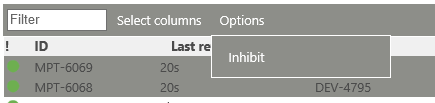
Figure 2: Inhibit various measurement points under "Table" view
Via this inhibition, it is possible to inhibit either the measured value alarms or the technical alarms. This function can be used when service/calibration is being carried out on the devices/measurement points.
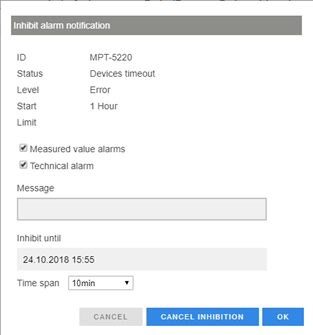
Figure 3: Inhibit alarm notification selection