Calibrate
All measuring points in RMS can be calibrated. The calibration data are stored in the database. If supported by the measuring point, the calibration data can also be written in the device. 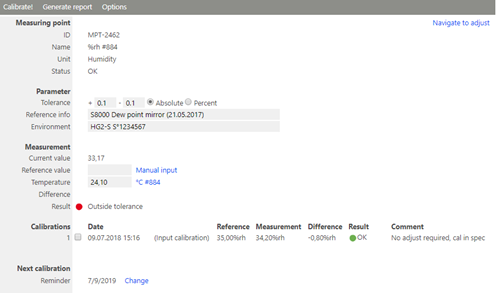
Figure 1: Calibration function in RMS
| Parameter | |
|---|---|
| Measurement |   |
| Calibrations | Date and reference value(s) of the last calibrations. |
| Next calibration | Here it is possible to enter a reminder for the next calibration. The reminder will appear with the yellow information symbol at the due date. |
1 Is only shown for humidity measuring points because the humidity measurement is also dependent on the temperature.
The following functions are available for acquiring the calibration values of the measuring point2:
| Calibrate | Execution of the calibration. In the pop-up window you can enter a comment on the calibration and select between input and output calibration. 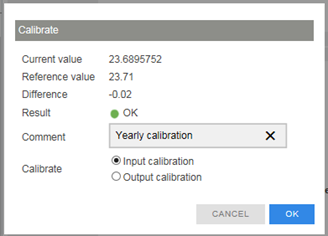 |
|---|---|
| Generate report | Generate a PDF report with all or the selected calibration values |
| Options | Writes the calibration values in the measuring point sensor for a possible later adjustment. - Calibration mode3 Increases the interval of the measuring point in order to obtain faster refreshing of data during the calibration. |
2 IMPORTANT: In the case of wireless data loggers, it is only possible to write to the device during the measurement interval, i.e. it can take up to the length of an interval before the data can be sent to the device.
3 Can only be used for measuring intervals greater than one minute.