Archive
If the archiving function has been switched on, the measured data can be archived and not deleted1. The Archive can be viewed via the menu "Tools" > "Archive". It does not have a group structure. All measuring points are stored in the same archive container.
| Important: There is a difference between delete and archive |
|---|
1The archiving function must be enabled in the software licence. It can also be switched on in the system settings
The measuring points are sorted by their ID. With the filter function it is possible to search by the ID or name of the measuring point.
Only the measuring points can be archived, the devices themselves are not archived.
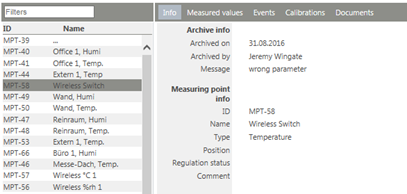
Figure 1: "Archive" view
By selecting multiple measuring points before archive, it is possible to archive all of them at the same time
Various information can be shown for every measuring point.
| Info | |
|---|---|
| Measured values | |
| Events | All events from the audit trail |
| Calibrations | Table with the calibration data for the measuring point |
| Documents | Documents that were uploaded for the measuring point |