Audit Trail Events Overview
Below is an overview of the most common events that appear within the Rotronic Monitoring System Audit Trail. This explains the meaning of the event, the possible root causes and proposed actions.
| Important: After deleting a user, device or measuring point, all data is deleted from the MS SQL database: - Disabled and deleted users are in the list of visible items in the event filter. - Deleted devices and measuring points cannot be filtered under events by name. Filter possible by ID number within the "joint group" (the name is displayed as "unknown item"). |
|---|
| Event type | Message. |
|---|---|
| Trigger | This event is triggered by a user action. |
| Meaning | An adjustment was carried out. |
| Possible root cause | A user did an adjustment on a measuring point. |
| Action | React according to internal SOP's. No reaction required in case this message is expected. |
| Event type | Message (if no limits are set), Warning or Alarm (if limits are set). |
|---|---|
| Trigger | This event is triggered by the system due to user configuration. |
| Meaning | An alarm script has been run. |
| Possible root cause | The conditions of an alarm script were fulfilled and the alarm script was executed. |
| Action | React according to internal SOP's. |
| Event type | Message. |
|---|---|
| Trigger | This event is triggered by the system. |
| Meaning | A different gateway has been allocated to a wireless device. |
| Possible root cause | |
| Action | React according to internal SOP's. No reaction required in case this message is expected. |
| Comment | This event can only occur if the gateways are setup to create a redundancy (same network ID and channel) |
| Event type | Message. |
|---|---|
| Trigger | This event is triggered by a user action. |
| Meaning | A calibration was carried out. |
| Possible root cause | A user did a calibration on a measuring point. |
| Action | React according to internal SOP's. No reaction required in case this message is expected. |
| Event type | Reminder. |
|---|---|
| Trigger | This event is triggered by the system due to user configuration. |
| Meaning | A calibration reminder was triggered. |
| Possible root cause | A user set a reminder for a calibration with a defined time lapse. The lapse was achieved. |
| Action | React according to internal SOP's. 1. Calibrate the measuring point in question. 2. Afterwards close the reminder eventually set a new reminder. |
| Event type | Message. |
|---|---|
| Trigger | This event is triggered by a user action. |
| Meaning | An element has been created. |
| Possible root cause | A user has created a new element (new user, group, device, measuring point or report). |
| Action | React according to internal SOP's. No reaction required in case this message is expected. |
| Event type | Reminder. | |
|---|---|---|
| Trigger | This event is triggered by the system. | |
| Meaning | The RMS server tries to read out (backfill) data from device after recovering from communication interruption. But the backfilling is not successful and data is missing from the SQL database. | |
| Details | As of the version 2.2.0, only one data gap event will be created. If a try again is carried out. The event will no longer but pending (in bold in the audit trail). Based upon the outcome, the event will remain closed (successful download of data) or will reopen (time or no data). As of such in the one data gap event, the following comments can be visible: 1. Try again. 2. No data. 3. Retry success. 4. Timeout. |
|
| Case 1 | Behavior | 1. Until V1.3.1: Three "read out data" trials with the "timeout" message. Afterwards the "data gap" event occurs. 2. As of V2.0.0: The system retries over a period of 3 days. If a "timeout" occurs, the logger cannot communicate with the gateway correctly. |
| Possible root cause | A communication problem between the device and the server during "read out data": | |
| Action | React according to internal SOP's. 1. Check the device status and make sure it is not in the device timeout status. Retry to read out the data manually: "Event" page > "Data gap event" > "Try again" (Warning: if all of the data cannot be downloaded, then a new "data gap" event will occur with the remaining data not yet downloaded). 2. Check the wireless signal strength: Network Planning and Monitoring. |
|
| Comment | Rotronic do not recommend installing the RMS-MLOG-T-868/915 in climatic chambers (limited communication, diminished battery life, condensation...). | |
| Case 2 | Behavior | The "read out data" trial with "no data" message followed by a "data gap" event. |
| Possible root cause | The device has no measured data for the asked time period: | |
| Action | React according to internal SOP's. 1. Check in the audit trail for related information such as "Measuring time not valid" during the period of the data gap. 2. Check in the IT system, whether the server time made a big jump. 3. Close the "data gap" as no data is available. |
|
| Comment | If "Measuring time not valid" appear in the audit trail, the device's real time clock (RTC) has been adjusted to the server time. The "data gap" time stamp may never have existed on the data logger. In which case, no data can be downloaded. | |
| Warning if the software version <V2.1.0, then on the Rotronic Cloud, the server time change cannot be seen within the audit trial. | ||
| Case 3 | Behavior | The "read out data" event closes with a "timeout" on an RMS-LOG-L. |
| Possible root cause | The RMS-LOG-L will not show a "data gap" but only a "timeout". | |
| Action | Check the available memory to confirm that the data is no longer available. | |
| Comment | Rotronic AG will update the RMS-LOG-L firmware to correct this issue. | |
| Case 4 | Behavior | The "read out data" trial with "no data" and the device is set to a 10s measurement interval. |
| Possible root cause | The server time has changed, but the change is smaller than 30s. The RMS software will communicate server time changes in the audit trail, only if the time change is >30s. |
|
| Action | React according to internal SOP's. | |
| Comment | Rotronic recommend monitoring the server time offset. This can be done via the Add other System Measurement Points. |
| Event type | Message. |
|---|---|
| Trigger | This event is triggered by a user action. |
| Meaning | An element has been deleted. |
| Possible root cause | A user has deleted an element (user, group, device, measuring point or template). |
| Action | React according to internal SOP's. No reaction required in case this message is expected. |
| Event type | Error. | |
|---|---|---|
| Trigger | This event is triggered by the system. The device timeout time is set by the user under the device settings. Rotronic recommend a device timeout of four (4) times the measurement interval. | |
| Meaning | Measured data was not received on the server side for longer than defined timeout limit. Then the device timeout from the WebService will be shown within the next 5 seconds. | |
| Case 1 | Behavior | Timeout for a certain period (defined by the user in the settings). |
| Possible root cause | For wired devices: For wireless devices: |
|
| Action | React according to internal SOP's. 1. Check to see if there are a any validation or maintenance work on-going, react according to the internal SOP's and check that the data was backfilled. 2. Check the power supply and network of the gateway and/or devices. 3. Check the wireless signal strength: Network Planning and Monitoring. 4. Check the wireless device parameter settings: Guidelines for RMS wireless parameter settings. |
|
| Comment | If various wireless networks are running, make sure that the networks are not in conflict with each other. | |
| Case 2 | Behavior | Timeout remains |
| Possible root cause | ||
| Action | React according to internal SOP's. Check the device status (hardware, power supply, network connection...). |
| Important: If the RMS wireless device is offline and in Device Timeout for a longer period of time, then this may cause for the wireless module to be sent into failure mode. This happens when a very low power supply is supplied to the device. Once the wireless module is in failure mode, it cannot be resuscitated. Once the wireless module has failed, the device's LED will blink differently to any way that is described in the manual. Recommendation: Please remove the batteries if the user anticipates keeping a wireless device disconnected for a longer period of time. |
|---|
| Event type | Message. |
|---|---|
| Trigger | This event is triggered by a user action. |
| Meaning | An element has been edited. |
| Possible root cause | A user has edited the property of an element (user, device, measuring point). |
| Action | React according to internal SOP's. No reaction required in case this message is expected. |
| Event type | Message. |
|---|---|
| Trigger | This event is triggered by the system. |
| Meaning | An element has been edited. |
| Possible root cause | The system (data base) moves all 30/31 days the old measurement values from one table to another one in the data base. |
| Action | React according to internal SOP's. No reaction required in case this message is expected. |
| Event type | Message. |
|---|---|
| Trigger | This event is triggered by the system. |
| Meaning | An element has been edited. |
| Possible root cause | The AES encryption key for a device has been updated. This event will appear at a regular interval within the audit trail. |
| Possible root cause RMS-CONVERTER-100 | When the RMS-CONVERTER-100 cannot reach any devices within the network, then the device will keep restarting due to the watchdog function. During the restart a new encryption key is exchanged. |
| Action | React according to internal SOP's. No reaction required in case this message is expected. |
| Event type | Message. |
|---|---|
| Trigger | This event is triggered by a user action. |
| Meaning | Alarm notifications have been inhibited. |
| Possible root cause | A user has inhibited an alarm or a warning for a certain time. |
| Action | React according to internal SOP's. No reaction required in case this message is expected. |
| Event type | Message. |
|---|---|
| Trigger | This event is triggered by a user action. |
| Meaning | Technical alarms have been inhibited. |
| Possible root cause | A user has inhibited technical alarms (sensor error, device timeout, low battery) for a certain time. |
| Action | React according to internal SOP's. No reaction required in case this message is expected. |
| Event type | Message. |
|---|---|
| Trigger | This event is triggered by a user action. |
| Meaning | A user has logged in. |
| Possible root cause | A user has logged in. |
| Action | React according to internal SOP's. 1. No reaction required in case this message is expected. 2. In case of an unexpected "Log in", contact your IT responsible. |
| Event type | Message. |
|---|---|
| Trigger | This event is triggered by a user action. |
| Meaning | A user has logged out. |
| Possible root cause | A user has logged out. |
| Action | React according to internal SOP's. 1. No reaction required in case this message is expected. 2. In case of an unexpected "Log out", contact your IT responsible. |
| Event type | Reminder. |
|---|---|
| Trigger | This event is triggered by the system. |
| Meaning | A device battery is low. |
| Possible root cause | |
| Action | React according to internal SOP's. Change the battery. After removing the old battery, wait minimum 1 minute or press the button on the device before putting in the new one: Reminder event - Low battery |
| Comment |
| Event type | Warning or Alarm. |
|---|---|
| Trigger | This event is triggered by the system due to user configuration. |
| Meaning | The measured value was out of defined warning/alarming limits. |
| Possible root cause | |
| Action | React according to internal SOP's. 1. Check measured data during alarm/warning. 2. In case of suspicion, check alarm/warning levels, delays and hysteresis. 3. Acknowledge/Inhibit the alarm/warning according to internal SOP's. 4. Remove simulated values if required. |
| Comment | Should the details in the audit trail be proceeded by [Retroactive], this simply means that the event was not triggered at the time that the measured value out of limit occurred, but at a later time, once the data was downloaded. |
| Important: If a "measured value out of limit" occurs and the measuring point then goes offline, the alarm will remain in warning or alarm. The warning/alarm will only end once the measuring point is online and the measurement value no longer above/below the defined limits. If a measuring point with a delay is in alarm/warning status and then goes offline, the "measured value out of limit" will occur after the delay time and only close once the measuring point is updated and no longer in alarm/warning. Warning: the hysteresis value and alarm limits for retroactively downloaded data are only seen after downloading data and warning/alarms will only be closed once this data downloaded. |
|---|
| Event type | Reminder. | |
|---|---|---|
| Trigger | This event is triggered by the system. | |
| Meaning | The time stamp received from the device (device time) is different to the system time (server time). It is important to note that the LAN devices synchronise with each communication and as of such should not show any measuring time not valid events unless the server time is changed. | |
| Case 1 | Behavior | Only a single message. The difference between the device time and the server time < 1 minute. |
| Possible root cause | A delay on the measuring data transmission. Service restart on server, server reboot, network issues. | |
| Action | React according to internal SOP's. No reaction required, if this happens seldom and the system works further without any issues. In case the message appears too frequently: 1. Check the settings such as the service restart interval. 2. Check the IT infrastructure. |
|
| Comment | 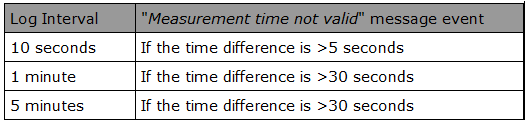 |
|
| Case 2 | Behavior | Only a single message. The difference between the device time and the server time > 1 minute. |
| Possible root cause | The device has restarted and it was using the last know time stamp, which was stored internally. | |
| Action | React according to internal SOP's. No reaction required, if this happened after re-powering or re-pairing a device. In case message appears too frequently: 1. Check the IIS settings about the application recycle. 2. Check the IT infrastructure. |
|
| Case 3 | Behavior | Consecutive messages every interval. |
| Possible root cause | Device control crashed due to low power supply: | |
| Action | React according to internal SOP's. 1. Change the device battery. 2. Remove the device from the very low temperature environment and consider the use of an extension cable. 3. Check the external power supply. |
|
| Case 4 | Behavior | The message appears for different devices at the same time and the device time on different devices are the same. |
| Possible root cause | The server time has been updated. The device time and server time will mismatch. | |
| Action | React according to internal SOP's. Check the IT infrastructure. The server time shall not have big jumps. Setup the monitoring of the server time offset via a system measuring point: Tools>Setup>Measuring Points Explained. |
|
| Case 5 | Behavior | Consecutive messages every interval and the device measuring time is always the same. |
| Possible root cause | The internal wireless antenna is creating disturbances, short circuiting the electronics. | |
| Action | React to the internal SOP's. Bend the antenna according to the instructions: What Antenna is installed on the Rotronic Devices. |
|
| Case 6 | Behavior | One or multiple devices have measuring time not valid events. |
| Possible root cause | Network messages are delivered over the network with a delay or remain blocked in the RMS server (IIS) for a certain time (due to an overload, virus scanner, Windows Update, backup or any process which is blocking the server). This scenario is very difficult to prove. Typically, these things always happen around the same time. |
|
| Action | React according to internal SOP's. Check the IT infrastructure. The server time shall not have big jumps. Setup the monitoring of the server time offset via a system measuring point: Tools>Setup>Measuring Points Explained. |
|
| Case 7 | Behavior | A LAN device has measuring time not valid events. |
| Possible root cause | The device has an internal problem with the time (e.g. the quartz). | |
| Action | Replace the device. |
| Important: The occurrence of an event depends on both the underlying reason and the interval of the device. An event that occurs due to a delayed message caused by network problems is likely to end quickly as soon as the network congestion is resolved. A change in server time is as follows: A LAN device updates the server time every 10 seconds, but does not make a correction until the median of the last 12 server time differences is greater than 500ms. As long as no correction has been made, the device may send measured values with an incorrect time. Therefore, it also depends on the measurement interval and when the correction is performed compared to the measurement interval. |
|---|
| Event type | Reminder. |
|---|---|
| Trigger | This event is triggered by the system. |
| Meaning | A probe was replaced. |
| Possible root cause | A change in probe serial number was detected. |
| Action | React according to internal SOP's. 1. No reaction required in case this message is expected. 2. Acknowledge the event according to internal SOP's. |
| Comment | The event is frequently seen during calibration should the probe be removed from the logger for calibration. |
| Event type | Message. | |
|---|---|---|
| Trigger | This event is triggered by the system. | |
| Meaning | RMS detects missing data for a period and tries to read back the missing data from the device. | |
| Case 1 | Behavior | With single devices and seldom occurs. |
| Possible root cause | Short-term failure of the wired or wireless connection. | |
| Action | React according to internal SOP's. No reaction required in case this message is expected. |
|
| Case 2 | Behavior | With single devices and frequently occurs |
| Possible root cause | ||
| Action | React according to internal SOP's. A frequent "read out data" message is an indication of a network issue (frequent communication interruption). Check the network and/or wireless connection: Guidelines for RMS wireless parameter settings. |
|
| Case 3 | Behavior | Happens to all measuring points at the same time. |
| Possible root cause | ||
| Action | React according to internal SOP's. 1. No reaction required if an expected offline of the server was expected. 2. Check the IIS settings about the application recycle. 3. Check the network connection. |
| Event type | Message. |
|---|---|
| Trigger | This event is triggered by the system due to user configuration. |
| Meaning | An email was sent to a certain user due to reminder/alarm/warning/error. The send E-Mail event can exist in the audit trail multiple times for one event if the E-Mail is sent to multiple users that are using different time zones and different E-Mail formats (short or normal) |
| Possible root cause | A reminder/alarm/warning/error occurred and an email was sent according to the notification settings. |
| Action | React according to internal SOP's. React based on the email content and/or internal SOP's. |
| Event type | Message. |
|---|---|
| Trigger | This event is triggered by the system due to user configuration. |
| Meaning | An SMS was sent to a certain user due to reminder/alarm/warning/error. |
| Possible root cause | A reminder/alarm/warning/error occurred and an SMS was sent according to the notification settings. |
| Action | React according to internal SOP's. React based on the SMS content and/or internal SOP's. |
| Event type | Message. |
|---|---|
| Trigger | This event is triggered by the system due to user configuration. |
| Meaning | Data was sent to a certain user due to the configuration under Actions. |
| Possible root cause | The Conditions of the action have been fulfilled and the data transmission has been executed. |
| Action | React according to internal SOP's. No reaction required in case this message is expected. |
| Event type | Error. |
|---|---|
| Trigger | This event is triggered by the system. |
| Meaning | An error has been detected on sensor/probe. During this time, no measurements will be carried out. No data gap event will appear in the audit trail as "data" is being collected, even if this data is not valid but only "---". |
| Possible root cause | |
| Action | React according to internal SOP's. 1. Check the audit trail for other related events. 2. Check the physical connection of sensor/probe. 3. Try with another sensor/probe if possible. |
| PCD details | The sensor error appears if: - no communication to the differential pressure sensor and/or to the ambient pressure sensor (for the flow version) is possible or takes too long. - the sensor used is the membrane version and the reading is above the sensor limits (out of range). |
| Event type | Reminder. |
|---|---|
| Trigger | This event is triggered by the system due to user configuration. |
| Meaning | A device is set to simulator mode. |
| Possible root cause | |
| Action | React according to internal SOP's. No reaction required in case this message is expected. |
| Event type | Error. |
|---|---|
| Trigger | This event is triggered by the system. |
| Meaning | A software exception has occurred. |
| Possible root cause | |
| Action | React according to internal SOP's. If the "software exception" only occurs seldom and right after the RMS service restart, no reactions are required. |
| Event type | Message. |
|---|---|
| Trigger | This event is triggered by the system. |
| Meaning | An event that is triggered by the system. |
| Possible root cause | For example an RMS server stop/restart. |
| Action | React according to internal SOP's. No reaction required in case this message is expected. |
| Additional details 1 | The system error "The RMS Database is not available" will appear if there is no communication between the RMS application and the RMS database for a period longer than 10 seconds. However, if the latency here is constantly too high, the RMS will no longer run correctly. A latency in the ms range should be aimed for here. |
| Additional details 2 | The following events will be visible within the audit trail every 29 hours as the IIS WebServer recycles: - Start WebPage Host: XXX Version: YYY Process: ZZZ. - Start WebService Host: XXX Version: YYY Process: ZZZ. - Stop Webpage Host: XXX Version: YYY. |
| Additional details 3 | The following event will be visible within the audit trail when the ServiceManager starts (when the server starts up): - RMS system changed to active state [XXX]. |
| Event type | Message. |
|---|---|
| Trigger | This event is triggered by the system due to user configuration. |
| Meaning | A telephone call was made to a certain user due to reminder/alarm/warning/error. |
| Possible root cause | A reminder/alarm/warning/error occurred and a telephone call was made according to the notification settings. |
| Action | React according to internal SOP's. React based on the telephone call content and/or internal SOP's. |
| Event type | Message. |
|---|---|
| Trigger | This event is triggered by a user action. |
| Meaning | A switch output has been turned off. |
| Possible root cause | |
| Action | React according to internal SOP's. No reaction required in case this message is expected. |
| Event type | Message. |
|---|---|
| Trigger | This event is triggered by a user action. |
| Meaning | A switch output has been turned on. |
| Possible root cause | |
| Action | React according to internal SOP's. No reaction required in case this message is expected. |
Updated: 13.02.2025.