Create Database Tables
The empty database now needs the tables for the RMS. Proceed as follows:
| Step 1 | Select the RMS database (red arrow in Figure a) and select "Open file" (orange arrow in Figure a). Then load the script Rotronic-Rms-Tables.sql delivered with the software into the database. | 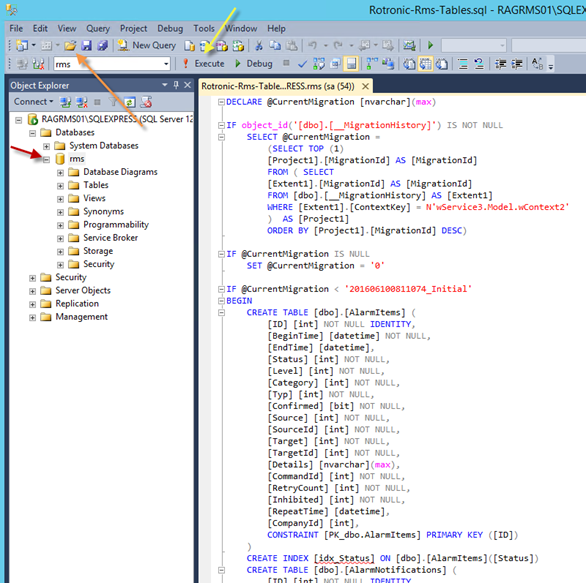 Figure a: View of the script "RMS-Tables.sql" |
|---|---|---|
| Step 2 | Click "Execute" to run the script (yellow arrow in Figure a). | |
| Step 3 | Verify that the tables have been created by clicking the "+" symbol in the RMS database (about 30 tables in the folder "Tables"). Sometimes the SQL server management studio needs to be restarted to see the tables. | |
| Step 4 | Configuration of the RMS database is then finished. |