Data Logging Function
In case of communication interruption between RMS-CONVERTER-100 and the RMS software, the converter logs the collected data onto the internal memory. As long as the connection is reestablished again, the data will be synchronized between converter and server, this will help avoid any data loss.
MS SQL database
- Data logging
The values of every measurement are saved in the memory with the time stamp.
The RMS-CONVERTER-100 logs data within the on-board MS SQL database: the measurement values and the time stamp. In case of a communication interruption between the RMS server software and the RMS-CONVERTER, the data will be stored for a maximum of 7 days.
| Important: - Logging Function The RMS-CONVERTER-100 has no backup battery or integrated power supply, meaning that the log function is only active when power is supplied to the device! - Time difference UTC - local time The real time clock of the RMS-CONVERTER-100 is set to UTC by the RMS software automatically and checked at every interval. When auditing the RMS-CONVERTER-100 log file, the time difference between UTC-time and local time must be taken into consideration. The difference between UTC and local time depends on the location and the clock change (summer/winter time). - Time synchronization The RMS-CONVERTER-100 internal real time clock is checked at every interval and corrected in case of a time deviation to the RMS server time. If a time synchronization of a RMS-CONVERTER-100 happens, it will be visible within the device log file (see chapter Troubleshooting - RMS-CONVERTER-100). A time synchronization of the RMS-CONVERTER-100 is not listed in the RMS audit trail (event table). |
|---|
- Data gaps
In order to avoid data gaps within RMS due to power or communication interrupts:
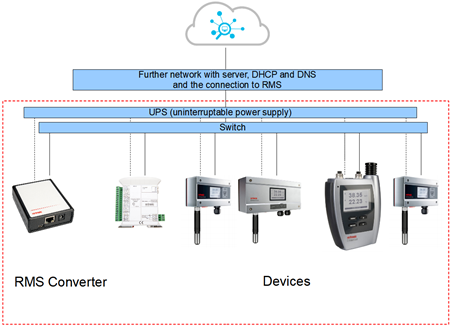
Figure 1: Recommendations for setting up the RMS-CONVERTER-100 on a network.