Measurement point Settings
Under "Measuring points", it is possible to see the measurement points within the selected groups.

Figure 1: Overview of the measuring points selection
With "Shift" or with "Ctrl", it is possible to select one of more of the measuring points. With one or more devices selected, it is possible to:
Within the "Measurement point settings" table, it is possible to view the following columns:
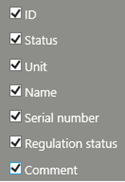 |
|
|---|---|
Figure 2: Overview of the "measurement point settings" table