IT Requirements for SMS and Telephone Alarming
The SMS and telephone alarming function within RMS helps regulated users monitor deviations of their critical process parameters (CCP's) 24 hours a day and 7 days a week.
All SMS's and telephone calls triggered by RMS are listed within the RMS audit trail. The telephone call also offers the possibility to inhibit an alarm for a specific time frame by pushing on a button during the telephone call, this event will also be shown within the audit trail.
The SMS and telephone alarming is using an API service from a third party company and as of such requires a specific configuration.
Here is the overview of the requirements:
-
The server where the RMS software is installed requires access to internet (bi directional communication).
-
The following ports are required for the SMS and telephone service:
-
The IP address of the service provider is not known and can change at any time. If a fixed IP address is required for firewall purposes, then Rotronic can offer this service.
-
The SMS and telephone alarming can work via a proxy server.
<system.net>
<defaultProxy>
<proxy usesystemdefault="true" proxyaddress="http://your-proxy.net:1234" bypassonlocal="true" />
</defaultProxy>
</system.net>
- TLS 1.2 is required for the system to work.
If all of these points are available, then the RMS-WEB/CLD-XDA needs to be ordered from Rotronic.
Within the RMS system settings, Rotronic will provide the user with the following details:
- A user account ID to connect to the external provider.
- A user account token to connect to the external provider.
- A telephone number for SMS's.
-
A telephone number for telephone calls.
-
Ensure that the ServiceManager is running from a valid user.
Open the Services Window and the entry «RMS Service Manager»:

Right Click and Select «Properties»:
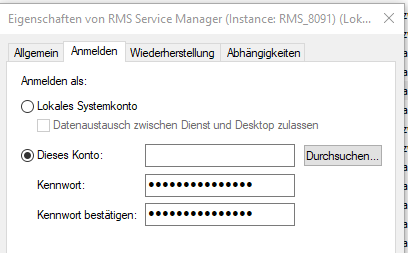
Change from «local system» to a valid user:

User is now visible for the RMS Service.
Restart the RMS Service Manager.