Tools>Setup>Shift plan
The Shift plan is a feature that was integrated in V2.9.0.
The customer has the option to adapt the notification along to a flexible shift planning of employees and not just inside/outside work hours. A typical use case is a 24hour operation in 3 shifts with different users active a different times.
| Shift plan | - Multiple Shift plans can be created - A Shift plan is assigned to one or multiple groups. It handles notifications for this groups or child groups - The Shift plan contains a list of shifts with begin- and end time and the users to be notified - A user must be assigned to a shift plan in order to be selectable for notifications - Fallback users can be defined for the case if no shift exist or no user defined for a shift 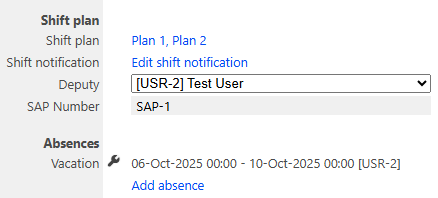 |
|---|---|
| Shift plan setting for the user | Define channels - E-Mail, SMS or Telefone are selectable separately for each alarm level - Phone calls will be executed to only one user at the same time and iterate the users in the defined repeat interval. Escalation - Enable escalation with an escalation delay time - If enabled, the user does not receive notifications until the escalation period is expired 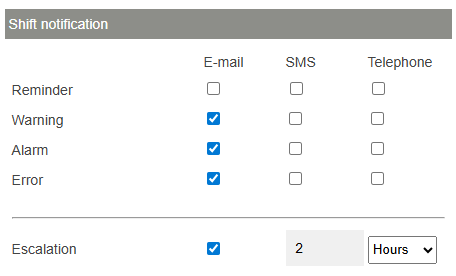 |
| Shift plan import | The shiftplan can also be imported using by CSV file. Format: ame;FromDate;FromTime;ToDate;ToTime;UserIds;SapIds Early;26-Sep-2025;00:00;26-Sep-2025;08:00;;SAP-1 Noon;26-Sep-2025;08:00;26-Sep-2025;16:00;;SAP-2 Late;26-Sep-2025;16:00;27-Sep-2025;00:00;;SAP-3 Name: Name of the shift FromDate: Shift Start (Date) FromTime: Shift Start (Time) ToDate: Shift End (Date) ToTime: Shift End (Time) UserIds: Comma separated list of users for the shift (RMS User Id's) SapIds: Comma separated list of users for the shift (SAP User Id's defined in the user setup) |
| Update V2.9.1 | When a user logs into RMS beeing in a different time zone then the RMS system time is, an User time zone is displayed additionally at Tools > Setup > Shift plan: 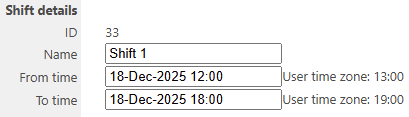 |
Updated: 20.05.2026