Area Characterization
| Print Screen 1 | 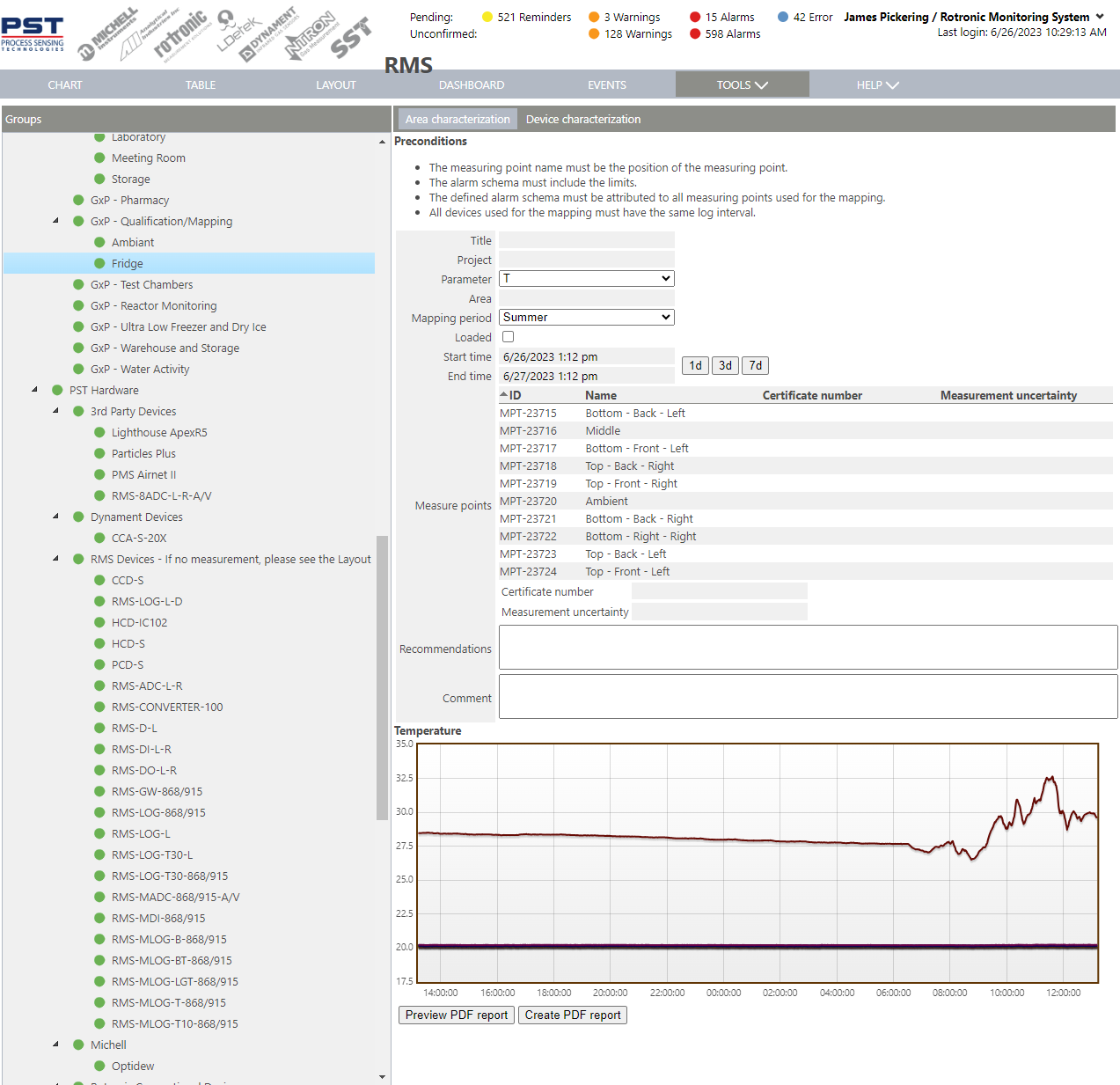 |
|---|---|
Preconditions:
- The measuring point name must be the position of the measuring point.
- The alarm schema must include the limits.
- The defined alarm schema must be attributed to all measuring points used for the mapping.
- All devices used for the mapping must have the same log interval.
Parameter entry:
- Title: The user can input a title for the area characterization.
- Project: The user can input a project for the area characterization.
- Parameter: select from either temperature (T) or temperature and relative humidity (T+H).
- Area: The user can input an area for the area characterization.
- Mapping Period: select from Summer, Winter, Area modification or Other.
- Loaded: select the tick box if the area is loaded. If a percentage is required, this can be added to the comments.
- Start time: The user can define when the area characterization started.
- End time: The user can define when the area characterization stopped.
It is possible to select predefined times: 1 day, 3 days and 7 days. The start and end time can also be changed directly by zooming in the chart.
-
Measure points: The measure points are automatically populated based upon the group selected.
-
Recommendations: Once the data reviewed, recommendations can be added.
- Comments: The user can add comments.
Report details:
-
Report:
-
Qualification date:
-
Project:
-
Area characterization:
-
Characterization overview:
-
Conclusion (per temperature and optionally humidity):
-
Measure point overview (per temperature and optionally humidity):
-
Measure point data overview (per temperature and optionally humidity):
-
Measure point deviation overview (per temperature and optionally humidity):
-
Measure point graphical overview (per temperature and optionally humidity):
-
Recommendations.
- Comments.
- Signatures.
- References (USP1079).
- Statistical overview (glossary).
Updated: 13.02.2025.